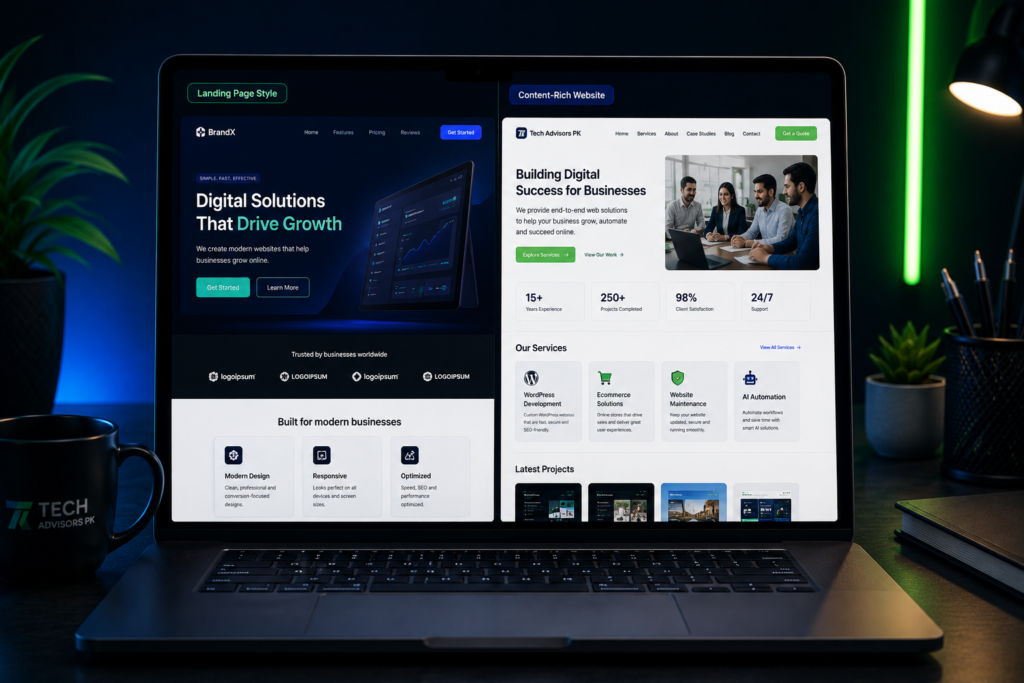
Choosing between Framer and WordPress is a common question for business owners who want a modern website. Both platforms can create professional websites, but they are not the same. Framer is often preferred for sleek landing pages, modern visuals, and fast design-focused websites. WordPress is usually stronger for content, service pages, blogs, SEO structure, and long-term website growth.
The right choice depends on your business goals. A startup may need a premium landing page. A clinic may need service pages and appointment forms. A consultant may need a blog and lead capture. An agency may need a scalable website with multiple service pages and automation. This guide explains the difference in simple business language so you can choose the right platform with confidence.
Table of Contents
Framer and WordPress: Quick Overview
What Is Framer?
What Is WordPress?
Framer vs WordPress: Main Comparison
Which Platform Is Better for Your Business Type?
When Framer Is the Better Choice
When WordPress Is the Better Choice
Website Editing, Content and SEO
Automation, Forms, WhatsApp and CRM
Maintenance, Ownership and Future Growth
Practical Checklist Before Choosing
Final Thoughts
FAQ
Framer and WordPress: Quick Overview
Framer and WordPress can both be used to build attractive business websites, but they serve different types of needs. Framer is design-first. WordPress is content-first and system-friendly. That does not mean one is always better than the other. It means each platform is better for a different type of business requirement.
Platform
Best For
Main Strength
Better When
Framer
Modern landing pages, portfolios, startup pages, premium brand websites
Clean design, fast visual editing, smooth modern layouts
You need a sleek website with fewer pages and strong visual impact.
WordPress
Business websites, service websites, blogs, SEO-focused websites, scalable websites
Content management, flexibility, plugins, service pages, SEO structure
You need long-term growth, multiple pages, blogs, integrations, or regular updates.
What Is Framer?
Framer is a modern website design and publishing platform. It is popular for building visually polished websites, landing pages, portfolios, startup pages, and brand-focused pages. It is useful when a business wants a clean, modern look without building a complex content system.
For many businesses, Framer works well when the website is simple, design-driven, and focused on one clear goal such as presenting a service, promoting an offer, or collecting leads through a landing page.
Modern and premium visual style
Good for landing pages and startup websites
Useful for fast design iteration
Clean animations and smooth page experience
Best when the website does not need many complex content sections
What Is WordPress?
WordPress is a flexible website platform used for business websites, blogs, service websites, e-commerce stores, and content-heavy websites. With tools like Elementor, WordPress can also support custom page design while keeping the website easy to update.
WordPress is usually a strong choice when a business needs service pages, blog posts, SEO structure, contact forms, integrations, and future expansion. It is also suitable when a website needs to grow over time instead of staying as a small one-page site.
Good for business websites with multiple pages
Strong for blogs and content marketing
Flexible with plugins and integrations
Works well with Elementor for visual page building
Suitable for SEO-focused service websites and long-term growth
Framer vs WordPress: Main Comparison
The best platform depends on what your website needs to do. If your website is mainly a modern presentation page, Framer can be a strong option. If your website needs ongoing content, SEO pages, service detail pages, lead forms, automation, or e-commerce, WordPress may be more practical.
Area
Framer
WordPress
Better Choice
Design flexibility
Very strong for modern visuals and animations.
Strong with Elementor or custom design.
Framer for sleek landing pages; WordPress for broader website systems.
Content management
Good for simpler websites and pages.
Very strong for blogs, service pages, categories, and updates.
WordPress
SEO structure
Can support SEO basics for simple websites.
Strong for SEO-focused service pages, blogs, metadata, schema plugins, and internal linking.
WordPress
Ease of editing
Easy for design-focused edits.
Easy with Elementor, but depends on setup quality.
Both
Scalability
Best for simpler or design-led websites.
Better for websites that grow with pages, posts, services, and integrations.
WordPress
Landing pages
Excellent for premium landing pages.
Strong with Elementor and custom sections.
Framer for design speed; WordPress for lead systems and SEO.
Forms and automation
Possible, but often needs external tools.
Strong with form plugins, CRM, WhatsApp, email, and automation workflows.
WordPress
E-commerce
Not usually the first choice for full stores.
Strong with WooCommerce and integrations.
WordPress
Maintenance
Simpler platform maintenance.
Needs updates, backups, and plugin care.
Framer for simplicity; WordPress for control.
Which Platform Is Better for Your Business Type?
Different businesses need different website structures. A small service provider may need a clean five-page website. A clinic may need service detail pages and appointment flow. A startup may need a premium landing page. An academy may need blogs, course pages, and forms.
Business Type
Recommended Platform
Reason
Startup or product launch
Framer or WordPress
Framer is strong for visual landing pages. WordPress is better if the launch needs blogs, forms, and long-term content.
Clinic, consultant, or service provider
WordPress
Service pages, FAQs, contact forms, SEO content, and lead capture are easier to scale.
Small local business
WordPress or Framer
Framer can work for a simple premium page. WordPress is better for ongoing updates and local SEO.
Agency or professional firm
WordPress
Multiple service pages, team pages, blogs, case studies, and lead forms usually need stronger structure.
Portfolio or personal brand
Framer
A sleek design-focused website can be enough if content needs are limited.
E-commerce business
WordPress/WooCommerce or Shopify
Full store features, product management, checkout, and order workflows need an e-commerce-focused setup.
Business needing automation
WordPress
Forms, CRM, WhatsApp, Google Sheets, and AI workflows can be connected more easily.
When Framer Is the Better Choice
Framer can be a good choice when the business wants a modern visual website without a heavy content structure. It is especially useful when design quality and fast page presentation are more important than complex backend features.
You need a modern landing page for one service, product, or campaign.
Your website has fewer pages and does not need a large blog.
You want a premium startup-style look with clean animations.
You do not need complex membership, advanced e-commerce, or heavy plugin features.
Your priority is visual polish and simple publishing.
Tech Advisors PK recommendationFramer can be a strong choice for modern landing pages, startup websites, personal brands, and premium one-page websites. It is best when your website goal is clear, focused, and design-led.
When WordPress Is the Better Choice
WordPress is usually the better choice when the website needs to grow over time. It is useful for businesses that need service pages, blog posts, SEO content, lead capture, forms, automation, and future functionality.
You need multiple service pages and detailed business information.
You want to publish blogs or resources regularly.
You need strong SEO structure and internal linking.
You want to connect forms, WhatsApp, CRM, Google Sheets, or email workflows.
You may need e-commerce, booking, memberships, or custom features later.
You want more flexibility and ownership over your website setup.
Website Editing, Content and SEO
Many business owners think only about design at the start. But after launch, the important question becomes: how easy is it to update the website, add pages, publish content, and improve SEO?
Need
Framer Fit
WordPress Fit
Practical Advice
Simple page edits
Good
Good with Elementor
Both can work if the website is built properly.
Regular blog publishing
Basic to moderate
Strong
Choose WordPress if blog content is part of your SEO plan.
Service detail pages
Good for limited pages
Strong for many services
WordPress is better if you need many service pages.
Internal linking
Possible
Strong
WordPress is easier for long-term content and SEO structure.
SEO plugin support
Limited compared with WordPress
Strong plugin ecosystem
WordPress is better for content-heavy SEO websites.
Non-technical team editing
Good for design edits
Good if Elementor setup is clean
Choose based on your team and update needs.
Automation, Forms, WhatsApp and CRM
A modern website should not only look good. It should help capture inquiries and move leads into a simple business process. This is important for small businesses, consultants, clinics, academies, agencies, and service providers.
WordPress usually gives more practical options for form plugins, lead capture, WhatsApp buttons, CRM automation, Google Sheets, email notifications, and AI agent workflows. Framer can also connect with tools, but WordPress is usually easier when the website needs to become a business system.
Automation Need
Why It Matters
Recommended Platform
Contact form to email
Helps you receive inquiries instantly.
Both, WordPress usually easier for advanced setup.
WhatsApp lead flow
Visitors can message quickly with pre-filled inquiry text.
Both
CRM automation
Leads can move into a pipeline for follow-up.
WordPress
Google Sheets lead record
Keeps inquiries organized automatically.
WordPress
AI agent or chatbot
Can answer common questions and support lead qualification.
WordPress or custom integration
Appointment booking
Useful for clinics, consultants, and service businesses.
WordPress
Maintenance, Ownership and Future Growth
Maintenance is another important factor. Framer can be simpler because there are fewer plugin updates to manage. WordPress gives more flexibility, but it also needs proper updates, backups, security checks, and performance care.
For a serious business website, maintenance should not be ignored. A website should stay secure, fast, updated, and aligned with your current services. This is especially important when your website has forms, plugins, blog content, or integrations.
Area
Framer
WordPress
Platform maintenance
Generally simpler because fewer moving parts are involved.
Needs regular updates, backups, and plugin checks.
Design changes
Good for visual editing and fast design updates.
Good with Elementor or custom development.
Adding new pages
Easy for limited page expansion.
Very suitable for adding many service pages and blog posts.
Future features
Good for simple sites, but advanced needs may require external tools.
Strong for adding features through plugins, custom code, and integrations.
Long-term control
Good for hosted design-led websites.
Strong if you want more control over hosting, content, and platform structure.
Practical Checklist Before Choosing
Before you choose Framer or WordPress, answer these questions. The right platform becomes clearer when you understand your actual business requirements.
Question
Choose Framer If
Choose WordPress If
How many pages do you need?
You need a small, focused website or landing page.
You need many pages, blogs, and service details.
Is blogging important?
Blogging is not a major focus.
You plan to publish content for SEO and education.
Do you need automation?
You only need simple forms or external tool links.
You need forms, CRM, WhatsApp, Google Sheets, or AI workflows.
Do you need e-commerce?
You do not need a full online store.
You need WooCommerce or store integrations.
Do you want advanced SEO structure?
You only need basic SEO setup.
You need service pages, schema, internal links, and long-term SEO content.
Will the website grow?
The website will stay small and design-focused.
The website will expand with content, services, and features.
Who will manage updates?
A design-focused person will handle simple updates.
Your team needs content, blog, service, and plugin control.
Common Mistakes to Avoid
Choosing the wrong platform usually happens when business owners focus only on design or only on price. A good platform decision should consider the full business use case.
Choosing Framer only because it looks modern, even when you need blogs, SEO pages, and automation.
Choosing WordPress without proper design, speed optimization, and maintenance planning.
Building a website without clear service pages and calls to action.
Ignoring mobile responsiveness and page speed.
Using too many plugins without a clear reason.
Publishing a beautiful website that does not help visitors contact you.
Forgetting future needs like CRM, WhatsApp flow, AI agents, or content growth.
Final Thoughts
Framer and WordPress are both useful platforms, but they are best for different needs. Framer is a strong choice for modern landing pages, premium visuals, and simple design-led websites. WordPress is a strong choice for business websites that need service pages, blog content, SEO structure, forms, integrations, and future growth.
If your business needs a simple modern page, Framer may be enough. If your business needs a scalable website with content, lead capture, automation, and long-term SEO, WordPress is usually the safer choice.
At Tech Advisors PK, we help businesses choose the right platform instead of forcing one solution. We build WordPress websites, Elementor pages,Wix websites, Framer websites, custom web development, landing pages, website maintenance, AI automations, AI agents, WhatsApp lead flows, CRM automation, and practical digital business systems.
Ready to Discuss Your Website or Automation Project?
Tech Advisors PK can help you plan and build the right solution for your business. Whether you need a WordPress website, Framer landing page, custom website, AI automation, WhatsApp lead flow, or CRM setup, we can guide you with a practical approach.
Framer is better for modern landing pages and design-focused websites. WordPress is better for service pages, blogs, SEO content, integrations, and long-term business growth.
Is WordPress good for a modern business website?
Yes. WordPress can create modern websites when it is built with strong design, clean Elementor sections, speed optimization, and proper content structure.
Can Framer be used for business websites?
Yes. Framer can work well for small business websites, startup pages, portfolios, and landing pages where design and simplicity are the main goals.
Which platform is better for SEO?
WordPress is usually better for SEO-focused websites because it supports blogs, service pages, categories, internal links, metadata, schema plugins, and long-term content growth.
Which platform is easier to maintain?
Framer can be simpler to maintain because it has fewer plugins. WordPress needs updates, backups, and plugin checks, but it gives more flexibility and control.
Can I connect WhatsApp and lead forms on both platforms?
Yes. Both platforms can support WhatsApp links and forms. WordPress is usually stronger when forms need CRM, Google Sheets, email, and automation workflows.
Should a small business choose Framer or WordPress?
Choose Framer for a simple, premium, design-led site. Choose WordPress if you need multiple pages, blogs, SEO, service details, forms, and future growth.
Can Tech Advisors PK build both Framer and WordPress websites?
Yes. Tech Advisors PK works with WordPress, Elementor, Framer, Wix, custom web development, landing pages, and automation systems.
Can I move from Framer to WordPress later?
Yes, but it requires rebuilding or migrating content carefully. It is better to choose the right platform at the start based on your long-term business needs.