Key idea: Automation should handle repetitive lead-management tasks while your team handles conversations that require judgment, trust, and sales expertise.
When a potential customer contacts your business, response time matters. A person asking about your services today may also be messaging several other businesses at the same time. If your team takes hours to respond, that lead may already have moved on.
This is where WhatsApp lead automation can help.
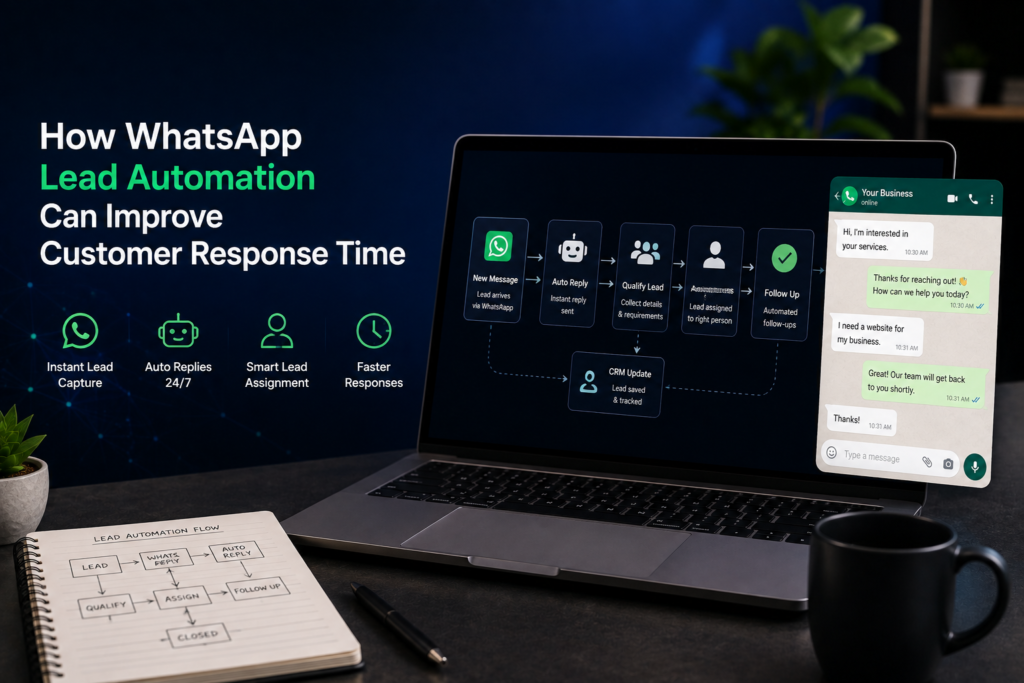
Instead of depending completely on someone being available to manually read every message, businesses can use WhatsApp automation to instantly acknowledge enquiries, collect important lead information, notify the right team member, and keep conversations moving.
For small businesses, agencies, clinics, consultants, academies, shops, and service providers, this can create a much smoother lead-handling process without removing the human side of sales.
What Is WhatsApp Lead Automation?
WhatsApp lead automation is the process of connecting WhatsApp with tools that automatically manage certain parts of a customer enquiry.
Reply immediately when a new enquiry arrives
Ask customers basic qualifying questions
Collect names, emails, service requirements, budgets, or preferred appointment times
Send lead information to a CRM
Notify a salesperson
Categorize leads based on interest
Schedule follow-up messages
Send booking or consultation links
Transfer important conversations to a human team member
The goal is not to replace your sales team.
The goal is to remove unnecessary manual work so your team can spend more time speaking with genuine prospects.
Why Customer Response Time Matters
Imagine someone visits your website and wants a quotation.
“Hi, I need a website for my company. Can you help?”
If nobody replies for several hours, the customer may contact another provider.
Now imagine they immediately receive a useful response explaining that their enquiry has been received and asking a few relevant questions.
The conversation has already started.
Even if a salesperson becomes available later, the lead has been acknowledged and important information may already have been collected.
This is one of the biggest advantages of automating WhatsApp leads.
1. Respond to New Leads Immediately
Businesses cannot always have someone monitoring WhatsApp every minute.
Working with existing clients
Attending meetings
Outside business hours
Handling multiple customer conversations
Busy completing projects
WhatsApp automation allows the first response to happen automatically.
“Thanks for contacting us. Please tell us which service you are interested in so we can connect you with the right person.”
The customer receives confirmation immediately instead of wondering whether their message was seen.
2. Automatically Collect Lead Information
Many businesses repeatedly ask every new customer the same questions.
For a website development enquiry, you may need to know:
Business name
Type of website required
Number of pages
Existing website URL
Required features
Expected timeline
Approximate budget
Instead of a salesperson manually asking every question, an automated conversation can collect the basic information first.
By the time your team enters the conversation, they already understand what the potential customer needs. This can make the sales conversation more productive.
3. Identify High-Priority Leads Faster
Not every enquiry requires the same level of attention.
“How much does a website cost?”
This person may be at an early research stage. Another person may say:
“We need our company website rebuilt and want to start this week.”
The second enquiry may require faster attention. A WhatsApp lead qualification system can use answers provided by the customer to categorize leads.
Hot Lead
Ready to start soon and provides clear project requirements.
Warm Lead
Interested but still comparing options or planning the project.
Cold Lead
General enquiry without an immediate requirement.
Your sales team can then prioritize conversations more effectively.
4. Send Leads Directly to Your CRM
One common problem in growing businesses is that customer information becomes scattered across different places.
Some leads may be inside WhatsApp. Others may be stored in spreadsheets. Some information may exist only in an employee’s phone.
Connecting WhatsApp with a CRM automation system can help centralize this information.
When someone contacts your business, their details can automatically be added to your CRM, including information such as:
Name
Phone number
Service required
Lead source
Lead status
Assigned salesperson
Follow-up date
Conversation notes
This gives your team a better view of the sales pipeline.
5. Notify the Right Team Member
Automation can also route enquiries to different people depending on what the customer needs.
A website enquiry can go to the web development sales team.
An automation enquiry can go to the automation specialist.
A support request can be sent to the support team.
A high-value business enquiry can immediately notify a senior salesperson.
Notifications could be sent through email, CRM systems, Slack, Telegram, or other internal tools depending on how your company operates.
This prevents valuable enquiries from sitting unnoticed inside WhatsApp.
6. Automate Follow-Ups
Some customers are interested but do not make a decision immediately. They may request information and then become busy.
Without a proper process, your team may simply forget to follow up.
A WhatsApp follow-up automation can help remind leads or notify your sales team that a follow-up is required.
For example, after sending a proposal, your system could create a follow-up task for the salesperson.
Good automation should not continuously send promotional messages. Instead, it should help your team maintain an organized and professional sales process.
7. Connect Website Leads With WhatsApp
WhatsApp automation becomes even more useful when connected with your website.
A potential customer might complete a contact form on your website. Instead of simply storing that enquiry in email, an automation workflow could:
Capture the form submission.
Add the lead to your CRM.
Notify your sales team.
Start an approved WhatsApp conversation where appropriate.
Create a follow-up task.
Your website and WhatsApp then become part of the same digital lead generation system rather than operating separately.
8. Provide Better Support Outside Business Hours
Customers do not always send enquiries during office hours.
You may receive messages late at night, during weekends, or while your team is unavailable.
An automated WhatsApp response can explain when someone will respond while still helping the customer.
“Thanks for contacting us. Our team is currently unavailable, but we have received your message. Please select the service you are interested in and we will get back to you during business hours.”
This is much better than leaving the customer without any response.
WhatsApp Automation Does Not Mean Replacing Human Conversations
One mistake businesses can make is trying to automate the entire customer relationship.
Customers may become frustrated if they cannot reach a real person.
Automation handles repetitive tasks. Humans handle important conversations.
Automation can collect information, organize leads, create CRM records, and trigger notifications.
Your team can then focus on understanding the customer’s requirements, answering questions, building trust, and closing the deal.
Example WhatsApp Lead Automation Flow
Step 1: Customer contacts the business
The customer sends a message through WhatsApp.
Step 2: Instant acknowledgement
The system confirms that the enquiry has been received.
The best setup depends on the size of your business and your existing systems.
You do not necessarily need a complicated automation system from the beginning. A simple workflow that captures enquiries and notifies your team can already improve the lead-management process.
Common Mistakes to Avoid
WhatsApp automation should make communication easier, not more frustrating.
Creating Very Long Automated Conversations
Customers usually want quick answers. Keep qualification questions focused.
Making It Difficult to Reach a Human
Always provide a clear way for serious customers to speak with your team.
Sending Too Many Follow-Ups
Automation should support genuine customer communication, not create spam.
Collecting Information You Do Not Need
Ask only for information that helps your team understand or process the enquiry.
Building Automation Without a Sales Process
Technology cannot fix an unclear sales process.
First decide:
What information your team needs
Who handles different leads
When follow-ups should happen
Where customer information should be stored
Then automate those steps.
Is WhatsApp Lead Automation Right for Your Business?
WhatsApp automation may be worth considering if:
Your business receives regular WhatsApp enquiries
Customers sometimes wait too long for responses
Leads are occasionally forgotten
Your team repeatedly asks the same questions
Customer information is scattered across different systems
You want better visibility of your sales pipeline
You want website enquiries connected with your CRM
Your team spends too much time on repetitive lead-management tasks
You do not need to automate everything. Start with the parts of your process that create the most repetitive work.
Build a Better Lead Flow With Tech Advisors PK
At Tech Advisors PK, we help businesses connect websites, WhatsApp, CRM systems, AI tools, and automation workflows into practical digital business systems.
Instead of treating your website, WhatsApp, and CRM as separate tools, we can help create a connected lead flow where enquiries are captured, organized, routed, and followed up more efficiently.
WhatsApp lead automation uses automated workflows to respond to enquiries, collect customer information, qualify leads, update CRM systems, notify team members, and manage follow-ups.
Can WhatsApp automation respond to customers instantly?
Yes. A properly configured system can acknowledge new enquiries immediately and guide customers through basic questions before a salesperson joins the conversation.
Can WhatsApp leads automatically go into a CRM?
Yes. WhatsApp can be connected with compatible CRM and automation systems so lead information can be stored automatically.
Can AI be connected with WhatsApp?
Yes. AI can be integrated into certain WhatsApp workflows for tasks such as lead classification, information processing, and controlled customer assistance.
Is WhatsApp automation suitable for small businesses?
Yes. Small businesses can begin with simple workflows such as instant responses, lead capture, CRM updates, and salesperson notifications without building a highly complicated system.
Will automation replace my sales team?
It does not have to. The most useful approach is usually to automate repetitive processes while allowing salespeople to handle conversations that require judgment, trust, negotiation, or detailed advice.