1. Why Lead Management Is a Challenge for Pakistani Businesses
2. What AI Automation Means in Simple Words
3. Manual Lead Handling vs AI-Assisted Lead Handling
4. Where Leads Usually Come From
5. A Practical AI Lead Management Workflow
6. How WhatsApp Lead Automation Helps Businesses Respond Faster
7. How CRM Automation Keeps Leads Organized
8. How AI Agents Can Support Customer Questions
9. What Should Not Be Fully Automated
10. Best Website and Automation Setup for Small Businesses
11. Practical Checklist Before Starting AI Automation
12. Final Thoughts
13. FAQ
For many Pakistani businesses, getting leads is not the biggest problem. The bigger problem is managing those leads quickly and properly after they arrive.
A customer may send a message on WhatsApp, fill out a website form, ask for a quote on Facebook, call your team, or leave details through an ad campaign. If your team replies late, forgets to follow up, or loses the lead details, the opportunity can easily be missed.
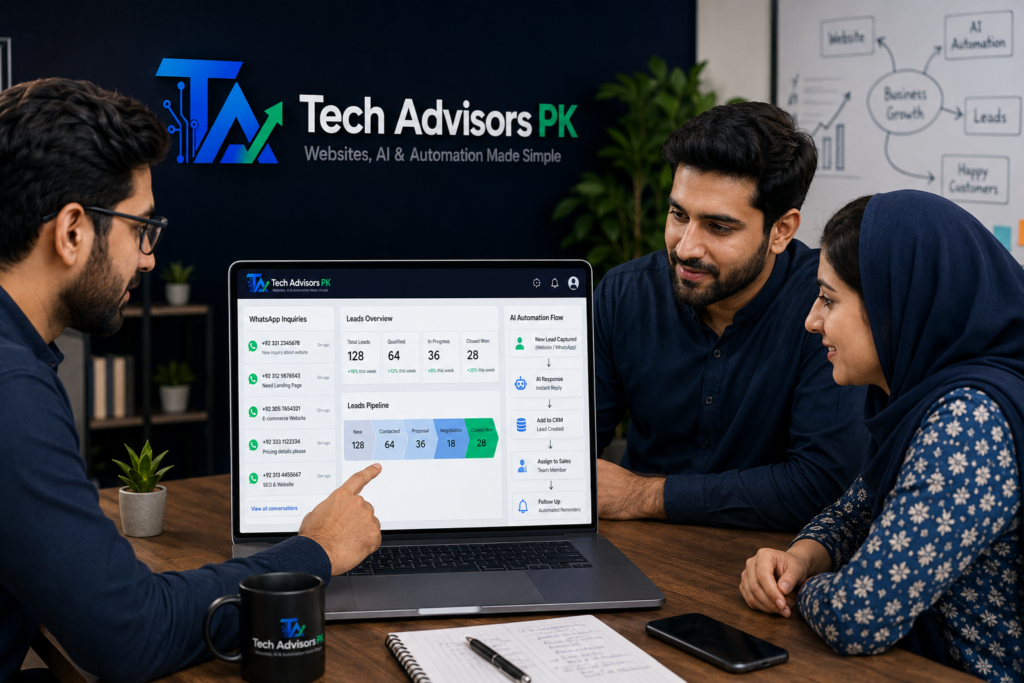
This is where AI automations can help. They can capture lead details, organize inquiries, send instant notifications, support follow-ups, and help your team respond faster without doing every small task manually.
AI automation does not mean replacing your team. For most small businesses, it means building a smarter system around your website, forms, WhatsApp, CRM, and daily lead handling process.
Why Lead Management Is a Challenge for Pakistani Businesses
Many businesses in Pakistan depend heavily on WhatsApp, phone calls, social media messages, referrals, and website forms. These channels are useful, but they can become difficult to manage when inquiries increase.
A small team may be handling sales, operations, delivery, customer support, and admin work at the same time. In this situation, leads can get mixed with normal messages or personal chats.
Common lead management problems
New inquiries are not saved in one place.
Sales team replies late because there is no instant alert system.
Customer details are scattered across WhatsApp, email, forms, and spreadsheets.
Follow-ups depend on memory instead of a clear process.
The business owner does not know which leads are hot, warm, or cold.
No one tracks which source is bringing better inquiries.
Repeated questions take too much time from the team.
When there is no structure, even good leads can be wasted. AI automations help by creating a smoother process from first inquiry to follow-up.
What AI Automation Means in Simple Words
AI automation means using software, workflows, and AI tools to perform repeated tasks automatically. The purpose is to save time, reduce manual work, and help your team focus on real conversations and closing deals.
For example, instead of manually copying each website inquiry into a sheet, the system can save it automatically. Instead of checking every message manually, an AI agent can help answer basic questions or collect initial details.
AI Automation Area
Simple Meaning
Business Use
Lead capture
Collecting inquiry details automatically.
Website form, WhatsApp link, landing page form.
Lead notification
Sending alerts to the right person.
Sales team receives instant email or WhatsApp notification.
Lead storage
Saving details in an organized place.
Google Sheets, CRM, or internal dashboard.
Lead qualification
Understanding if the lead is serious.
Budget, service need, timeline, and location questions.
Follow-up reminders
Reminding your team to respond again.
Useful when customers do not reply immediately.
AI agent support
Answering repeated questions or collecting details.
FAQs, service questions, appointment requests.
Manual Lead Handling vs AI-Assisted Lead Handling
Manual lead handling works when a business has very few inquiries. But when the number of leads grows, manual systems often become slow and inconsistent.
AI-assisted lead handling gives your business a structure. It does not remove human decision-making, but it helps your team work faster and stay organized.
Area
Manual Lead Handling
AI-Assisted Lead Handling
Response speed
Depends on team availability and working hours.
Can send instant alerts, auto-replies, and routing.
Data storage
Often saved in chats, notebooks, or scattered files.
Saved automatically in a sheet or CRM.
Follow-up
Depends on memory or manual reminders.
Follow-up tasks and reminders can be created automatically.
Lead quality
Team checks every inquiry manually.
Basic questions can qualify leads before the sales call.
Reporting
Hard to know which source brings better leads.
Lead source and status can be tracked clearly.
Team coordination
Multiple people may miss the same inquiry.
Leads can be assigned to the right person.
Where Leads Usually Come From
Before building automation, a business should understand where inquiries are coming from. Different lead sources need different handling.
Lead Source
Typical Problem
Useful Automation
Website contact form
Form is received by email but not tracked.
Save inquiry to Google Sheets or CRM and notify team.
WhatsApp button
Chats get mixed with daily conversations.
Use pre-filled messages and lead source tracking.
Facebook or Instagram
Messages are spread across social platforms.
Route inquiries into a structured follow-up process.
Google Business Profile
Calls and messages are not always recorded.
Create internal lead log and follow-up checklist.
Landing page
Campaign leads need fast response.
Instant notification and lead assignment.
Referral leads
Details are shared casually and forgotten.
Add manual quick-entry form connected to CRM or sheet.
E-commerce store
Product questions and abandoned carts need support.
Automated inquiry routing and order-related notifications.
A Practical AI Lead Management Workflow
A good automation workflow should be simple enough for your team to use every day. It should not become complicated or difficult to manage.
Here is a practical workflow for small businesses, service providers, clinics, academies, agencies, and online stores.
Step
What Happens
Automation Benefit
1. Visitor arrives
Customer visits your website, landing page, or service page.
Clear CTA guides the visitor to WhatsApp or a form.
2. Lead submits details
Customer fills a form or sends a WhatsApp message.
System captures name, phone, service need, and message.
3. Lead is saved
Details go to Google Sheets, CRM, or database.
No inquiry is lost in email or chat history.
4. Team is notified
Sales or support team receives instant alert.
Faster response time and better coordination.
5. Lead is qualified
System asks basic questions or tags the lead.
Team can focus on serious prospects.
6. Follow-up is scheduled
Reminder is created if no response happens.
Reduces missed opportunities.
7. Status is updated
Lead moves from new to contacted, interested, or closed.
Business owner can review pipeline status.
How WhatsApp Lead Automation Helps Businesses Respond Faster
WhatsApp is one of the most important communication channels for businesses in Pakistan. Customers often prefer sending a quick message instead of filling a long form.
A simple WhatsApp button is useful, but a smarter WhatsApp lead flow can make it more professional.
Useful WhatsApp automation ideas
Use pre-filled WhatsApp messages based on the service page.
Add different WhatsApp buttons for website, landing page, maintenance, or automation inquiries.
Ask customers to share business name, required service, timeline, and contact details.
Save lead source information so you know which page generated the inquiry.
Create team notifications for urgent or high-value inquiries.
Use follow-up reminders for prospects who do not respond after the first conversation.
The goal is not to make WhatsApp complicated. The goal is to make the first customer contact easier, faster, and more organized.
How CRM Automation Keeps Leads Organized
A CRM helps you track leads, conversations, status, and follow-ups. For small businesses, this can be as simple as a Google Sheet or as advanced as a full CRM system.
The best CRM setup depends on business size and workflow. A small business can start with a simple lead sheet and later upgrade to a CRM when the process becomes bigger.
Lead scoring, reports, workflows, automation, team performance.
Custom dashboard
Businesses with special process requirements.
Custom reports, internal tasks, integrations, and role-based views.
How AI Agents Can Support Customer Questions
AI agents can help answer repeated questions, collect initial information, and guide customers to the right service. They are useful when your business receives the same questions again and again.
For example, an AI agent can explain service types, ask for project details, collect contact information, and send the lead to your team. This gives customers a faster first response while your team focuses on serious conversations.
Customer Question Type
AI Agent Can Help With
Human Team Should Handle
Basic service questions
Explain general services and guide to relevant page.
Final recommendation and project discussion.
Price inquiry
Collect requirements before quote.
Final pricing and scope confirmation.
Appointment request
Collect preferred date and contact details.
Confirm meeting and availability.
Technical issue
Collect issue summary and website link.
Technical diagnosis and solution.
Custom project
Ask business goals, platform, and expected features.
Planning, proposal, and project approval.
What Should Not Be Fully Automated
Automation is powerful, but not everything should be fully automated. Some parts of the customer journey need human understanding, trust, and business judgment.
Keep human involvement for these areas
Final project pricing and scope decisions.
Complex customer concerns or complaints.
High-value leads that need personal attention.
Custom website or automation planning.
Sensitive business or payment discussions.
Final approval before sending official proposals.
The best setup is a balance: automation handles repeated tasks, while your team handles strategy, trust, and closing.
Best Website and Automation Setup for Small Businesses
A business website and automation system should work together. Your website explains your business, while automation helps manage what happens after a visitor contacts you.
Business Type
Recommended Website Setup
Recommended Automation
Service provider
Home, About, Services, Service Detail Pages, Contact.
WhatsApp CTA, inquiry form, lead sheet, follow-up reminders.
Clinic or academy
Service pages, location, FAQs, contact and appointment section.
Product pages, categories, contact and delivery info.
Product inquiry flow, order notifications, customer questions.
Consultant or agency
Professional profile, services, case-style examples, blog.
Lead qualification form, CRM pipeline, meeting request flow.
Growing company
Multi-page website with SEO structure and conversion pages.
CRM automation, reporting, team assignment, AI support agent.
Practical Checklist Before Starting AI Automation
Before adding automation, your business should have a clear process. Automation will not fix a confusing workflow. It works best when the lead journey is already planned.
Checklist Item
Why It Matters
Status
Define lead sources
Helps understand where inquiries come from.
Pending / Done
Create clear contact forms
Collects useful customer details.
Pending / Done
Add WhatsApp CTAs
Makes contact easier for local customers.
Pending / Done
Decide lead fields
Keeps data structured and searchable.
Pending / Done
Choose storage system
Google Sheets, CRM, or custom dashboard.
Pending / Done
Set notification rules
Ensures the right person sees the lead quickly.
Pending / Done
Create follow-up stages
Helps track new, contacted, interested, and closed leads.
Pending / Done
Prepare FAQ answers
Helps AI agents answer common questions properly.
Pending / Done
Test the full flow
Prevents broken forms or missed alerts.
Pending / Done
Review monthly
Improves automation based on real business use.
Pending / Done
Final Thoughts
AI automations can help Pakistani businesses manage leads faster by reducing manual work, organizing inquiries, improving follow-ups, and giving customers a quicker first response.
The best automation setup is not always the most complicated one. For many businesses, a simple website form, WhatsApp flow, Google Sheet or CRM, team notification, and follow-up reminder system can make a major difference in daily operations.
As your business grows, you can add AI agents, better lead qualification, CRM automation, reporting dashboards, and more advanced workflows.
At Tech Advisors PK, we help businesses create practical website and automation systems that support real business goals, not just trendy tools.
Ready to discuss your website or automation project? Tech Advisors PK can help you plan and build the right solution for your business. Whether you need a website, landing page, WhatsApp lead flow, CRM automation, or AI agent, we can guide you with a practical approach.
AI automation means using tools, workflows, and AI systems to handle repeated business tasks such as lead capture, notifications, follow-ups, customer questions, and CRM updates.
Can AI automation help Pakistani businesses manage WhatsApp leads?
Yes. A business can use structured WhatsApp links, forms, lead tracking, and notifications to make WhatsApp inquiries easier to manage.
Do I need a website before starting automation?
A website is highly useful because it gives customers a clear place to learn about your services and submit inquiries. However, some automations can also start from forms, WhatsApp, or landing pages.
Is AI automation only for large companies?
No. Small businesses can also use simple automations such as contact form alerts, Google Sheets lead storage, WhatsApp buttons, and follow-up reminders.
Can AI agents answer customer questions?
Yes. AI agents can help answer repeated questions, collect initial details, and guide customers to the right service. Complex discussions should still be handled by a human team.
What is CRM automation?
CRM automation means saving leads, updating statuses, assigning team members, and creating follow-up reminders automatically inside a CRM or lead management system.
Will automation replace my sales team?
No. For most businesses, automation supports the sales team by handling repeated tasks and organizing data. Human communication is still important for trust and closing deals.
What type of businesses can benefit from AI automation?
Clinics, academies, agencies, consultants, service providers, shops, real estate teams, e-commerce stores, and startups can all benefit if they manage repeated inquiries.
How can Tech Advisors PK help with AI automation?
Tech Advisors PK can help plan and build website forms, WhatsApp lead flows, CRM automation, AI agents, landing pages, and digital business systems based on your business needs.