PurposeThis article explains what website development services include, how business owners can compare options, and how websites can support leads, trust, automation, and long-term growth.
A business website is no longer just a few pages on the internet. For many companies, it works as a digital office, sales support system, customer information hub, and lead generation tool.
When business owners search for website development services, they often find many options: WordPress websites, custom web development, landing pages, e-commerce stores, Wix websites, Framer websites, website redesign, maintenance, and AI automation. The challenge is understanding what each service means and which one is actually needed.
This guide explains website development services in simple language so business owners can make better decisions before hiring a website development company or web development agency.
In This Article
What website development services include
Which website services are useful for different business goals
How to choose between WordPress, Wix, Framer, Shopify, and custom development
What features help a website generate leads
How website automation can save time and improve follow-up
What to check before hiring a development team
What Are Website Development Services?
Website development services include the planning, design, building, testing, launching, and ongoing improvement of a website. These services can be simple or advanced depending on the business need.
A small business may only need a clean service website with a WhatsApp button. A growing company may need a larger website with service detail pages, blogs, forms, CRM automation, and lead tracking.
Table 1: Main parts of website development services
Service Area
What It Means
Why It Matters
Planning
Understanding business goals, pages, services, audience, and contact flow.
Helps the website support real business needs instead of just looking nice.
Design
Creating the visual layout, colors, spacing, and user experience.
Builds trust and makes information easy to understand.
Development
Building the website in WordPress, Wix, Framer, custom code, or another platform.
Turns the design and structure into a working website.
Content Setup
Adding service text, images, CTAs, FAQs, and business information.
Helps visitors understand the business clearly.
Forms and Contact Flow
Adding contact forms, WhatsApp buttons, inquiry forms, and email notifications.
Helps capture leads and customer inquiries.
Testing and Launch
Checking mobile view, links, forms, speed, and basic SEO before launch.
Reduces errors before customers visit the site.
Maintenance
Updating content, fixing issues, checking security, and improving performance.
Keeps the website reliable after launch.
Why Business Owners Need More Than a Good-Looking Website
A beautiful website is useful, but design alone is not enough. A business website should also explain services clearly, guide visitors toward action, and make it easy for customers to contact the business.
A professional website should answer practical customer questions:
What does this business do?
Can I trust this company?
Which service is right for me?
How can I contact them quickly?
Do they have useful information or examples?
What is the next step if I want to start?
If a website does not answer these questions, visitors may leave even if the design looks modern.
Core Website Development Services Business Owners Should Know
Different businesses need different services. A clinic, academy, consultant, agency, local shop, or service provider may not need the same website structure. The right services depend on business goals, customer behavior, and future plans.
Table 2: Common website development services and where they fit
Website Service
Best For
Common Deliverables
Business Website
Small businesses, consultants, clinics, agencies, academies, and service providers.
Home, About, Services, Contact, FAQ, WhatsApp button, mobile responsive design.
Service Detail Pages
Businesses with multiple services that need proper explanation.
Individual pages for each service with overview, benefits, process, FAQs, and CTA.
Landing Page Design
Ad campaigns, launches, offers, WhatsApp campaigns, and lead generation.
One focused page with headline, benefits, trust points, form, and CTA.
Website Redesign
Businesses with outdated, slow, or confusing websites.
Improved layout, better content structure, mobile fixes, CTA updates, and visual refresh.
E-commerce Website
Shops and product-based businesses.
Product pages, cart, checkout, payment options, delivery details, and customer support flow.
Businesses that want faster lead handling and less manual work.
Form routing, WhatsApp flow, Google Sheets or CRM updates, AI agents, and follow-up systems.
Which Website Platform Is Right for Your Business?
A good website development company should not force every business into the same platform. WordPress, Wix, Framer, Shopify, and custom development can all be useful when used for the right reason.
The best platform depends on your content needs, editing control, SEO goals, design expectations, integrations, and budget planning.
Table 3: Website platform comparison for business owners
Platform
Best For
Main Advantage
Consider Before Choosing
WordPress
Business websites, service websites, blogs, and SEO-focused sites.
Flexible, scalable, and suitable for long-term content growth.
Needs proper setup, maintenance, and security care.
Elementor
Custom WordPress pages and editable layouts.
Allows visual page building without coding every section.
Must be optimized properly to avoid slow pages.
Wix
Simple small business websites and quick editable websites.
Easy to manage for non-technical users.
Less flexible for advanced custom features.
Framer
Modern landing pages, startups, consultants, and premium brand websites.
Clean modern design and smooth visual experience.
Best when the website goal is focused and content is not too complex.
Shopify
Online stores and product businesses.
Strong e-commerce tools and hosted store management.
Monthly platform cost and less control than custom systems.
Custom Development
Advanced websites, portals, dashboards, and special business systems.
Full control over features, performance, and integrations.
Needs more planning, development time, and technical support.
Website Development Process: What Should Happen Step by Step?
A professional web development agency should follow a clear process. This helps the business owner understand what is happening and prevents confusion during the project.
Table 4: A practical website development process
Step
What Happens
Business Owner Benefit
1. Discovery
The team learns about your business, services, goals, competitors, and target customers.
The website is planned around real business needs.
2. Structure Planning
Pages, navigation, service detail pages, CTAs, forms, and content flow are planned.
Visitors can find information easily.
3. Design Direction
Brand colors, layout style, images, typography, and section design are decided.
The website starts to match your business identity.
4. Development
The website is built using the selected platform and required features.
The plan becomes a working website.
5. Content Placement
Service text, FAQs, images, buttons, forms, and trust sections are added.
The website becomes useful for real visitors.
6. Testing
Mobile view, links, forms, speed, and basic SEO settings are checked.
Errors are reduced before launch.
7. Launch and Support
The website goes live and support begins for updates or fixes.
The business can start using the website confidently.
Important Features Every Business Website Should Have
A business website should be simple to understand and easy to use. Visitors should not struggle to find services, contact details, or the next step.
Clear homepage headline that explains the business
Service pages or service detail pages
Mobile-friendly design
Fast loading pages
WhatsApp button and contact form
FAQ section for common questions
Trust-building content such as process, experience, or project examples
SEO-friendly titles, URLs, and image alt text
Footer with contact information and useful links
Basic tracking or analytics setup
Lead Generation Features That Can Improve Business Results
A website should not only display information. It should guide visitors toward action. This is especially important for service-based businesses that depend on inquiries, appointments, calls, or consultations.
Table 5: Website features that support lead generation
Feature
Purpose
Example Use
WhatsApp Button
Makes it easy for customers to message quickly.
A visitor clicks WhatsApp to ask about a service.
Contact Form
Collects structured inquiry details.
Name, phone, service needed, budget, and message.
Call-to-Action Buttons
Guides visitors toward the next step.
Book a Free Consultation, Request a Quote, View Services.
Service Detail Pages
Explains each service in more depth.
A website maintenance page explains monthly support.
FAQ Section
Answers common doubts before contact.
Customers understand timelines, platforms, and support.
Lead Tracking
Helps understand where inquiries come from.
Tracking form submissions and traffic sources.
Automation Flow
Sends leads to email, sheets, CRM, or notifications.
The team receives lead details without manual copying.
How AI Automation Can Support Website Development
AI automation should not be added only because it sounds modern. It should solve real business problems. For many businesses, the first useful automation is lead handling.
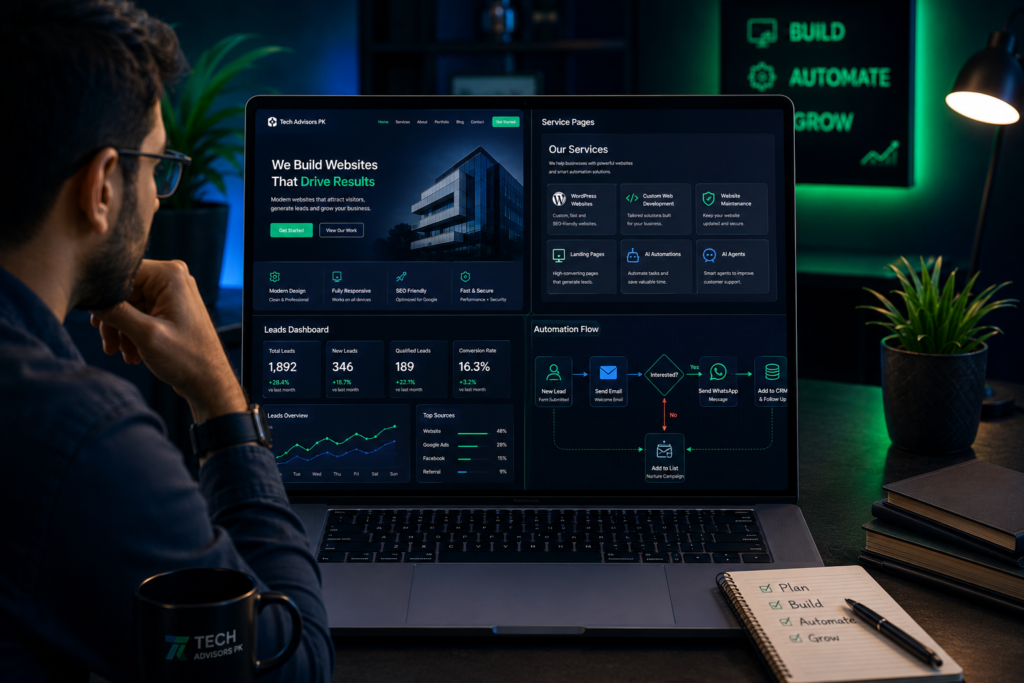
For example, when a visitor fills out a form, the system can notify the business, save the lead, and send a basic reply. This can reduce delays and missed opportunities.
Table 6: Useful website automation options
Automation
What It Does
Why It Helps
Form to Email
Sends inquiry details to the business email.
The lead reaches the team quickly.
Form to Google Sheets
Stores leads automatically in a spreadsheet.
Keeps records organized.
WhatsApp Lead Flow
Allows visitors to message directly with a pre-filled inquiry.
Makes contact easier for mobile users.
CRM Automation
Adds leads into a sales pipeline.
Helps track follow-ups and lead status.
AI Agent
Answers common questions or guides visitors.
Saves time on repeated questions.
Auto Reply
Sends confirmation after a form is submitted.
Improves customer experience.
Follow-Up Reminder
Reminds the team to contact a lead.
Reduces missed inquiries.
What Affects the Cost of Website Development Services?
Website cost should depend on requirements, not random package labels. A small landing page and a multi-page business website are not the same. A website with automation, forms, CRM integration, or custom features will need more planning and work.
Instead of looking only for the cheapest option, business owners should compare the value, quality, support, and clarity of the service.
Table 7: Common factors that affect website development cost
Cost Factor
Why It Changes the Scope
Number of Pages
More pages require more content, design, layout work, testing, and internal linking.
Design Complexity
Custom sections, premium visuals, and animations require more effort than a basic template.
Platform Choice
WordPress, Wix, Framer, Shopify, and custom development have different setup and maintenance needs.
Content Requirements
Writing, editing, formatting, and SEO content can affect project scope.
Forms and Integrations
Contact forms, CRM, WhatsApp, payment systems, and booking tools require setup and testing.
Automation
Lead routing, AI agents, Google Sheets, and follow-up flows add extra planning and configuration.
Maintenance and Support
Ongoing updates, backups, fixes, and changes may be handled separately.
Website Development Checklist for Business Owners
Use this checklist before approving a website project or launching a new site.
Table 8: Website launch checklist
Checklist Item
Why It Matters
Status
Homepage clearly explains the business
Visitors understand your offer quickly.
Pending / Done
Services are easy to find
Customers can see what you provide.
Pending / Done
Each important service has details
Improves trust and helps SEO.
Pending / Done
Website works on mobile
Most visitors may check from phones.
Pending / Done
WhatsApp button is working
Visitors can message quickly.
Pending / Done
Contact form is tested
Inquiries should reach the correct email or system.
Pending / Done
Images have alt text
Supports accessibility and SEO basics.
Pending / Done
SEO titles and meta descriptions are added
Helps search engines understand pages.
Pending / Done
No demo content remains
Avoids unprofessional template text.
Pending / Done
Footer details are correct
Contact and navigation remain easy to access.
Pending / Done
Basic security and backups are considered
Protects the website after launch.
Pending / Done
Questions to Ask Before Hiring a Website Development Company
A professional website development company should be able to answer basic project questions clearly. If the answers are vague, it may create problems later.
Which platform do you recommend for my business and why?
Will the website be mobile responsive?
Will I be able to edit content later?
Will you create service detail pages?
Will contact forms and WhatsApp links be tested?
Will you add basic SEO settings?
Will you remove all demo/template content?
Will you provide support after launch?
Can the website connect with automation or CRM later?
How will progress updates be shared?
Common Mistakes Business Owners Should Avoid
Many website problems happen because the project starts without a clear plan. Avoid these common mistakes:
Choosing only the cheapest option without checking quality
Starting design before finalizing website structure
Using a template without replacing all demo content
Ignoring mobile view and page speed
Not creating proper service pages
Not testing contact forms or WhatsApp buttons
Not adding basic SEO titles and image alt text
Not planning future maintenance
Adding too many plugins or heavy effects without purpose
Building a website that looks nice but does not generate inquiries
How Tech Advisors PK Approaches Website Development Services
Tech Advisors PK focuses on practical websites and digital systems. The goal is not only to create a good-looking website, but to build a website that helps the business explain services, build trust, capture inquiries, and prepare for future growth.
Our services include WordPress websites, Elementor development, Wix websites, Framer websites, custom web developmen , landing pages, website redesign, website maintenance, AI automations, AI agents, WhatsApp lead flow, CRM automation, and digital business systems.
For business owners, the right solution depends on current needs and future plans. Some businesses need a simple website first. Others need a complete website with service pages, lead forms, and automation.
Ready to Discuss Your Website or Automation Project? Tech Advisors PK can help you plan and build the right solution for your business. Whether you need a business website, landing page, WordPress setup, Wix or Framer website, custom web development, or automation system, we can guide you with a practical approach.
Website development services include planning, designing, building, testing, launching, and maintaining a website. They can also include SEO setup, forms, WhatsApp integration, automation, and ongoing support.
Which website platform is best for a small business?
It depends on the business goal. WordPress is strong for flexible business websites and blogs. Wix is useful for simple editable sites. Framer is good for modern landing pages. Custom development is better for advanced features.
Do I need a full website or a landing page?
A landing page is best for one focused offer or campaign. A full website is better when your business needs Home, About, Services, Contact, FAQ, and multiple service detail pages.
Can a website help generate leads?
Yes, if it is built with clear services, strong CTA buttons, contact forms, WhatsApp links, mobile-friendly design, and useful content that helps customers take action.
Can my website connect with WhatsApp?
Yes. Your website can include WhatsApp buttons, pre-filled message links, and automation flows to help visitors contact your business quickly.
What is website maintenance?
Website maintenance includes updates, backups, security checks, speed checks, bug fixes, content changes, and general support after launch.
What is the difference between web design and web development?
Web design focuses on layout, visuals, and user experience. Web development focuses on building the working website, forms, integrations, and technical setup. A strong website needs both.
Can AI automation be added to a business website?
Yes. AI automation can support lead handling, FAQs, form routing, CRM updates, auto replies, follow-up reminders, and customer support workflows.
Should every service have its own page?
If a service is important for your business, it is better to create a separate service detail page. This helps customers understand the service and supports SEO.
How can I start with Tech Advisors PK?
You can start by sharing your business details, required pages, services, goals, and preferred platform. Tech Advisors PK can suggest the right website or automation setup for your needs.